Introduction
As a web developer, having a portfolio website is no longer optional—it's essential. Your portfolio is your digital handshake, your 24/7 representative in the online world. When I started my journey in web development, I quickly realized that building my own portfolio website would be the perfect way to showcase my skills while learning the fundamentals of HTML, CSS, and JavaScript.
In this article, I'll share my complete journey of building my first web developer portfolio from scratch. Whether you're a beginner or just starting out, this guide will give you practical insights and inspiration to create your own stunning portfolio website.
Why I Decided to Build My Own Portfolio Website
The decision to build my own portfolio came from a simple realization: theory alone wasn't enough. I had completed several online courses and tutorials, but I lacked a tangible project that demonstrated my abilities. Here's why I took the leap:
- Career Growth: A professional portfolio website significantly increases your credibility as a web developer. It's proof that you can build real, functional websites.
- Personal Branding: Instead of relying solely on LinkedIn or GitHub, I wanted a personalized space that reflected my unique style and skills.
- Learning by Doing: Building a real project from scratch teaches you more than any tutorial ever could. You encounter real problems and learn to solve them.
- Client Attraction: Whether you're freelancing or job hunting, a portfolio website is your best marketing tool.
Planning the Portfolio Website
Before writing a single line of code, I spent time planning. This phase is crucial and often overlooked by beginners. Here's how I approached it:
Choosing the Layout and Sections
I researched dozens of developer portfolios to understand what works. I decided on these essential sections:
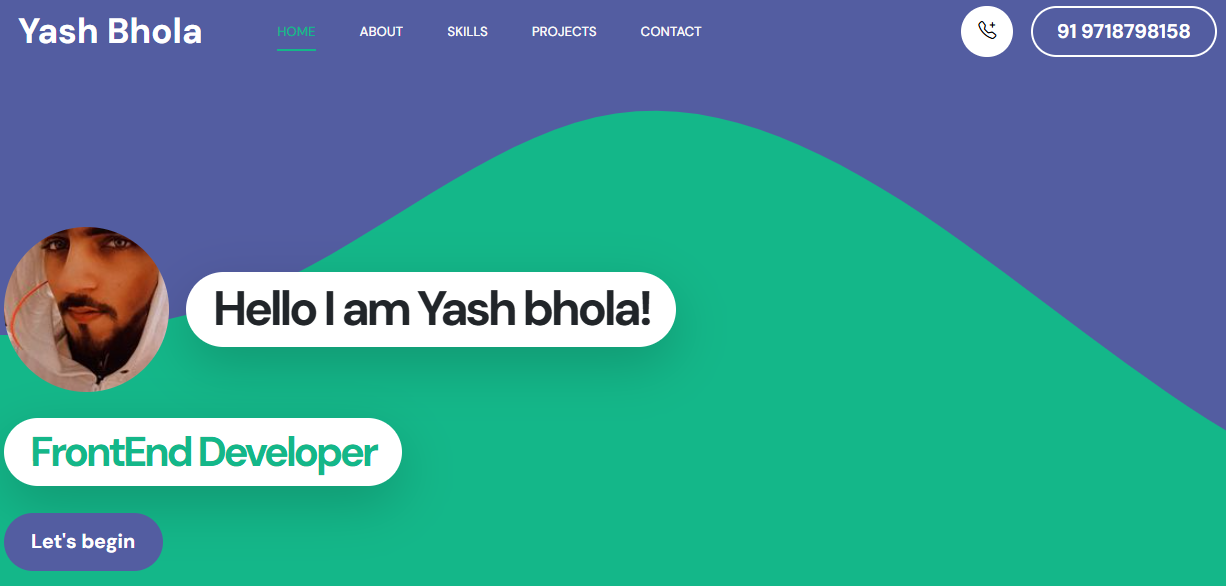
- Hero Section: A compelling introduction with my name, title, and a brief tagline
- About Me: My background, skills, and what makes me unique
- Projects Showcase: Highlighting my best work with descriptions and live links
- Skills Section: Technologies I'm proficient in, displayed visually
- Contact Form: Making it easy for visitors to reach out
Deciding Content Structure
I sketched wireframes on paper first. This helped me visualize the user experience and navigation flow before diving into development. Simple sketches saved me hours of coding later.
Technologies Used
I kept my tech stack simple and focused on the fundamentals. This approach helped me truly understand how everything works together:
HTML for Structure
HTML formed the backbone of my portfolio website. I used semantic HTML5 elements like <header>, <nav>, <main>, and <footer> to create a well-structured, accessible website. Proper HTML structure also helped with SEO.
CSS for Styling and Responsiveness
CSS brought my design to life. I used Flexbox and CSS Grid for layouts, custom CSS variables for consistent theming, and media queries to ensure my portfolio looked great on all devices—from mobile phones to large desktop screens.
JavaScript for Interactivity
JavaScript added the dynamic elements: smooth scrolling navigation, animated skill bars, a working contact form with validation, and interactive project cards. These small touches made the experience more engaging.
Key Features of My Portfolio Website
Here are the standout features that made my web developer portfolio effective:
Fully Responsive Design
With over 60% of web traffic coming from mobile devices, responsiveness wasn't optional. My portfolio adapts seamlessly to any screen size, ensuring visitors have a great experience regardless of their device.
Projects Showcase with Live Demos
I featured my best projects with detailed descriptions, screenshots, and links to live demos and GitHub repositories. This gave visitors concrete proof of my abilities.
Clean UI and Fast Loading
I prioritized simplicity and performance. By optimizing images, minimizing CSS and JavaScript, and avoiding unnecessary libraries, I achieved fast load times—crucial for both user experience and SEO.
SEO-Friendly Structure
I implemented proper meta tags, semantic HTML, descriptive alt text for images, and a clear site structure. These SEO practices help my portfolio rank well in search engines when people look for web developers.
Challenges I Faced and How I Solved Them
Building a portfolio website wasn't without obstacles. Here are the main challenges and solutions:
Layout Issues and Cross-Browser Compatibility
Initially, my layout looked perfect in Chrome but broke in Safari and Firefox. I learned to test across multiple browsers regularly and use CSS prefixes and fallbacks for better compatibility.
Achieving True Responsiveness
My first responsive attempts were clunky. Elements overlapped on tablets, and navigation broke on small screens. I solved this by adopting a mobile-first approach and testing thoroughly on real devices, not just browser dev tools.
Performance Optimization
My initial version had large uncompressed images that slowed load times. I compressed all images, used lazy loading for off-screen content, and minified my CSS and JavaScript files. This reduced load time from 5 seconds to under 2 seconds.
What I Learned from This Project
Building my first HTML CSS JavaScript project taught me invaluable lessons:
- Problem-Solving Skills: Every bug forced me to think critically and research solutions, making me a better developer.
- Attention to Detail: Small details like spacing, typography, and color choices significantly impact user experience.
- SEO Matters: Technical skills alone aren't enough—understanding SEO helps your portfolio get discovered.
- Iteration is Key: My first version wasn't perfect, and that's okay. I continuously improved based on feedback and new skills.
- Confidence Boost: Completing this project gave me the confidence to tackle larger, more complex web development projects.
Tips for Beginners Building Their First Portfolio
If you're ready to build your own web development portfolio, here's my advice:
- Start Simple: Don't try to build everything at once. Start with a single-page portfolio and expand later.
- Focus on Content: Your projects and skills matter more than fancy animations. Substance over style.
- Make it Personal: Let your personality shine through. Your portfolio should feel uniquely yours.
- Test on Real Devices: Emulators are helpful, but nothing beats testing on actual phones and tablets.
- Get Feedback: Share your portfolio with other developers, friends, and mentors. Fresh eyes catch issues you'll miss.
- Keep it Updated: Your portfolio should grow with you. Regularly add new projects and update old content.
- Don't Wait for Perfection: Launch your portfolio even if it's not perfect. You can always improve it later.
Conclusion
Building my first portfolio website using HTML, CSS, and JavaScript was one of the most rewarding experiences in my web development journey. It transformed me from someone who followed tutorials to someone who could build real, functional websites from scratch.
Your portfolio is more than just a website—it's your professional identity online. It opens doors to freelance opportunities, job offers, and valuable connections. If you're a beginner web developer, I strongly encourage you to start building your portfolio today. Don't overthink it—just start coding.
Remember, every expert developer started exactly where you are now. The difference is they took action. So grab your code editor, open a new project, and begin creating your own web developer portfolio. Your future self will thank you.
About Yash Bhola
Yash is a passionate web developer and freelancer specializing in creating beautiful, functional websites. He shares his journey, tips, and tutorials to help aspiring developers grow their skills and build successful careers in web development.